Best Free Parental
Control Apps
for Android (2026)
Your kid has a smartphone. You need parental controls. But you shouldn't need to pay $15/month for them. Here's what actually works — and what's truly free.
📋 TL;DR
- ✓Best overall free: BlockerPlus — content blocking, uninstall protection, social media limits
- ✓Best built-in: Google Family Link — screen time, app approval, location
- ✓Best combo: BlockerPlus + Family Link + Safe DNS = 100% free, 3-layer protection
📊 The Scary Numbers
The average kid gets their first smartphone at age 10. By age 12, 73% of children have seen explicit content online — often by accident. Built-in phone settings alone won't protect them.
Let's be honest. Most "free" parental control apps aren't really free.
They let you install the app, play with settings for 10 minutes, and then — surprise — the features you actually need are locked behind a $12/month paywall.
We tested every major option. Here's what's genuinely free, what's "free with an asterisk," and what actually keeps your kid safe.
The 7 Best Free Parental Control Apps
1. BlockerPlus — Best Free Content Blocker
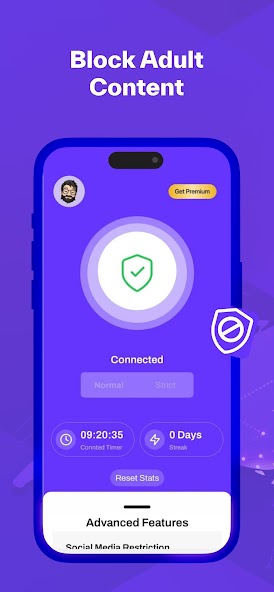
BlockerPlus isn't marketed as a traditional "parental control" app. But it has exactly the features parents need most — and they're all free.
Here's the thing: most parental control apps focus on surveillance. BlockerPlus focuses on actually blocking the bad stuff.
Why parents love BlockerPlus:
- ✓Uninstall Protection — Most apps can be uninstalled by a determined teenager in 30 seconds. BlockerPlus requires YOU to approve any uninstall.
- ✓Browser Install Blocking — The #1 trick kids use? Installing a new browser. BlockerPlus prevents that entirely.
- ✓1M+ adult sites blocked — Across every browser and app on the device.
- ✓Social Media Time Limits — Daily caps on Instagram, TikTok, YouTube, and any other app.
- ✓Custom keyword blocking — Block specific words or phrases.
Best for: Parents who want to block inappropriate content without turning their kid's phone into a tracking device.
👉 Download BlockerPlus Free on Google Play
🛡️ Protect your child's phone in under 5 minutes
Download BlockerPlus Free →2. Google Family Link — Best Built-In Option
Free | ★ 3.5
Google's own parental control comes pre-installed on most Android phones. Deep OS integration, app approval, screen time, location tracking.
But it gets worse: content filtering is basic. It relies on SafeSearch, which is easily bypassed. It doesn't filter in-app browsers either.
The fix? Pair Family Link with BlockerPlus for real protection. Family Link handles screen time and app approvals. BlockerPlus handles content blocking.
3. Qustodio — Best Freemium Traditional
Free (1 device) / $54.95/yr (5 devices) | ★ 4.0
Professional-grade filtering with a generous single-device free tier. Web filtering, time limits, search monitoring. But you need premium ($55-98/year) for multiple devices.
4. Norton Family — Best from a Security Brand
30-day trial / $49.99/yr | ★ 4.1
Comprehensive but calling it "free" is a stretch. Good if you're already using Norton products.
5. Kaspersky Safe Kids — Best Value Premium
Free / Premium $14.99/yr | ★ 4.2
Best price-to-value ratio. At $14.99/year, it's dramatically cheaper than competitors for location, geofencing, and YouTube monitoring.
6. Kids Place — Best for Young Kids
Free / Premium $3.99 | ★ 4.1
Custom launcher showing only approved apps. Great for ages 3-8. Not a content filter — it's a controlled sandbox environment.
7. FamiSafe — Most Feature-Rich (But Expensive)
3-day trial / $10.99/mo | ★ 4.0
The gold standard for features — web filtering, TikTok monitoring, driving reports. But at $132/year, it's the priciest option by far.
⚠️ "Free" Doesn't Always Mean Free
Many apps advertise as free but lock essential features behind paywalls. BlockerPlus is one of the few that gives you uninstall protection, browser blocking, AND content filtering — all in the free tier.
Which Apps Are Actually Free?
✅ Actually free (all features):
- ✓BlockerPlus — Full content blocking, uninstall protection, app blocking
- ✓Google Family Link — Screen time, app approval, location
- ✓Kids Place — App launcher for young kids
⚠️ "Free" with major limits:
- ⚠️Qustodio — 1 device only
- ⚠️Norton Family — 30-day trial only
- ⚠️FamiSafe — 3-day trial only
💡 Pro Tip: The 15-Minute Free Setup
The most effective parental control setup combines three free layers: BlockerPlus + Google Family Link + Safe DNS. That covers content filtering, device management, and network-level blocking. No credit card needed.
Our Recommended Free Setup (15 Minutes)
Here's what most people don't realize: one app isn't enough. Your kid WILL find the gap.
The trick is layering three free tools together:
- 1.BlockerPlus — Adult content blocking, uninstall protection, social media limits
- 2.Google Family Link — Screen time scheduling, app approval, location
- 3.Safe Search enabled — On Google, YouTube, and Bing
Three layers. 100% free. Covers content filtering, device management, and search safety.
🛡️ Ready to protect your child's device?
Free. Setup takes under 5 minutes. Uninstall protection included.
Download BlockerPlus Free →5 Mistakes Parents Make With Parental Controls
Think about it: even the best app fails if it's set up wrong. Here are the most common mistakes we see:
- 1.Only installing one layer. Your kid WILL find the gap. Use multiple tools together.
- 2.Not enabling uninstall protection. A determined 12-year-old can uninstall any app in 10 seconds. BlockerPlus fixes this.
- 3.Forgetting about alternative browsers. Chrome filters are useless if your kid installs Firefox. BlockerPlus blocks new browser installs.
- 4.Setting it and forgetting it. Check in monthly. Update filters as your child grows.
- 5.All surveillance, no conversation. Have age-appropriate conversations about online safety. Technology works best alongside open dialogue.
Start Protecting Your Child's Device
Free. Setup takes under 5 minutes. Uninstall protection included.
Download BlockerPlus Free →Related Articles
- How to Block Adult Content on Your Child's Phone
- How to Block Adult Websites on Chrome Android
- Best Porn Blockers for Android 2026
- Signs of Porn Addiction: How to Know If You Have a Problem

Preetam Rangadal
Founder, BlockerPlus · Digital Wellness Expert
Preetam is the founder of BlockerPlus, used by 105,000+ people worldwide to overcome porn addiction. With a background in mobile development and a passion for digital wellness, he builds tools that help people take back control of their lives. Learn more →
Disclaimer: This content is for informational purposes only and does not constitute medical or psychological advice. If you're struggling with addiction, please consult a licensed healthcare professional. BlockerPlus is a digital tool, not a substitute for professional treatment.