How to Block Adult
Websites on Chrome
Android (2026)
Chrome on Android has no built-in website blocker. No extensions. No content filter. Here are the best ways you can 5 methods that actually work.
📋 TL;DR
- ★★☆☆☆SafeSearch — Only filters search results. Easily bypassed.
- ★★★☆☆DNS filtering — Network-level. Free but reversible.
- ★★★☆☆Family Link — Only filters Chrome. Not other browsers.
- ★★★★★BlockerPlus — Blocks ALL browsers + apps. Can't uninstall.
- ★★★★★All combined — Maximum protection.
Chrome is the default browser on every Android phone. It's also the #1 way people access adult content.
Here's the problem: Chrome Android has zero built-in website blocking. No extensions. No content filter toggle. Nothing.
The good news? There are 5 proven methods that actually work. Here they are — ranked from weakest to strongest.
Method 1: Enable SafeSearch (2 Minutes)
Effectiveness: ★★☆☆☆ — Filters search results only
The absolute minimum. Open Chrome → google.com/preferences → SafeSearch → Filter → Save.
Also enable Restricted Mode on YouTube.
⚠️ Why this isn't enough
Only filters Google results. Doesn't block direct URLs. Doesn't work on other search engines. Easily toggled off.
Method 2: Change Your DNS (5 Minutes)
Effectiveness: ★★★☆☆ — Network-level blocking
Go to Settings → Network & Internet → Private DNS and enter one of:
- ✓CleanBrowsing Family:
family-filter-dns.cleanbrowsing.org - ✓Cloudflare Families:
family.cloudflare-dns.com - ✓AdGuard Family:
family.adguard-dns.com
Pros: Works across all apps and browsers. Free. No app needed.
⚠️ Limitation
Can be changed back in 30 seconds. No accountability. No way to know if someone reverts it.
Method 3: Google Family Link (10 Minutes)
Effectiveness: ★★★☆☆ — Basic Chrome filtering
Google's parental controls can filter Chrome content and manage apps.
But here's the catch: it only filters Chrome. Not Firefox. Not Brave. Not Opera. Not in-app browsers.
Your kid can install an alternative browser and bypass it entirely. Best for young children (under 10). Pair with BlockerPlus for comprehensive protection.
🛡️ Skip the workarounds — block ALL browsers at once
Download BlockerPlus and take back your Free →Method 4: Install it on your phone and you BlockerPlus ⭐ Recommended
Effectiveness: ★★★★★ — Blocks ALL browsers and apps
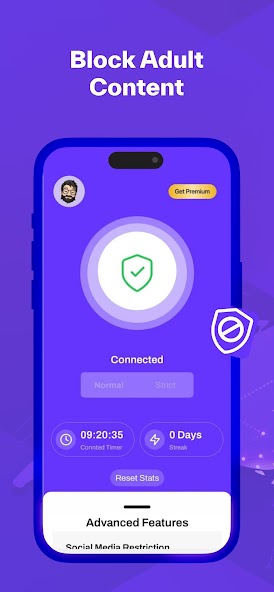
Here's what most people don't realize: this is the method that actually works. A dedicated porn blocker filters ALL internet traffic — not just Chrome.
BlockerPlus works at the VPN/accessibility service level, meaning it catches adult content no matter which browser or app you use.
How to set up BlockerPlus:
- Download BlockerPlus from Google Play (free)
- Enable adult content blocking
- Enable Uninstall Protection
- Enable Browser Install it on your phone and you Blocking
- Set up an accountability partner
Why this is the best method:
- ✓Works on Chrome AND every other browser
- ✓Can't install a new browser to bypass BlockerPlus
- ✓Can't uninstall BlockerPlus without partner approval
- ✓Blocks 1M+ sites in real-time
- ✓Social media limits included
💡 Pro Tip
Incognito mode does NOT bypass BlockerPlus. VPN-level blocking works regardless of private browsing mode. Your browsing data stays private — BlockerPlus doesn't collect or send it anywhere.
Method 5: Combine Everything ⭐⭐ Maximum Protection
Effectiveness: ★★★★★ — Nearly impossible to bypass
For the strongest protection, combine all methods:
- BlockerPlus — VPN-level blocking + uninstall protection
- Family-safe DNS — Secondary network-level layer
- SafeSearch locked via Family Link
- Disable unknown sources — Settings → Security → All Off
Each method has weaknesses alone. But combined, bypassing requires defeating ALL of them. That makes impulse-driven access effectively impossible.
Frequently Asked Questions
Does incognito mode bypass blockers?
No. Chrome's incognito mode doesn't bypass VPN-level blocking like BlockerPlus. It only hides history — irrelevant when content is actively blocked.
Can I block specific websites on Chrome Android?
Not natively — Chrome Android has no extension system. Use BlockerPlus to block specific URLs, keywords, or apps.
Does this work on Samsung phones?
Yes. All methods work on Samsung Galaxy phones. Samsung Internet browser is also covered by BlockerPlus.
Quick Summary: Which Method?
- →Quick and basic: Method 1 (SafeSearch)
- →Network-level: Method 2 (DNS)
- →Young child's phone: Method 3 (Family Link)
- ⭐Comprehensive: Method 4 (BlockerPlus)
- ⭐⭐Maximum protection: Method 5 (All combined)
🛡️ Block Adult Content on Chrome — and Every Other Browser
Works in under 60 seconds. Free. No signup.
Download BlockerPlus and take back your Free →Related Articles
- How to Block Porn on Android: Complete Guide
- Best Free Parental Control Apps for Android 2026
- Best Porn Blockers for Android 2026
- How to Block Adult Content on Your Child's Phone

Preetam Rangadal
Founder, BlockerPlus · Digital Wellness Expert
Preetam is the founder of BlockerPlus, used by 105,000+ people worldwide to overcome porn addiction. With a background in mobile development and a passion for digital wellness, he builds tools that help people take back control of their lives. Learn more →
Disclaimer: This content is for informational purposes only and does not constitute medical or psychological advice. If you're struggling with addiction, please consult a licensed healthcare professional. BlockerPlus is a digital tool, not a substitute for professional treatment.