How to Block Porn
on Android
Complete Guide (2026)
Every method to block adult content on your Android phone — from free built-in settings to the best blocking apps. Step-by-step instructions that actually work.
📋 TL;DR
The most effective way to block porn on Android is a dedicated blocker app. BlockerPlus is free, blocks 1M+ sites, has uninstall protection, and blocks new browser installs.
For maximum protection: BlockerPlus + DNS filtering + SafeSearch. Three layers. All free.
Looking for a reliable way to block porn on your Android phone?
Whether you want to protect your children, break an addiction, or simply remove distractions — you're in the right place.
Here's what most guides won't tell you: built-in settings alone won't cut it. SafeSearch is a joke. Family Link only filters Chrome. DNS can be changed back in seconds.
The good news? There's a better way. And it's free.
But here's what most people don't realize:
Why Block Porn on Android?
Before the "how," let me explain the "why." Millions of people are choosing to block adult content for real reasons:
- →Mental health — Studies link excessive porn to anxiety, depression, and relationship issues
- →Productivity — The average person wastes 2+ hours daily on distracting content
- →Child safety — Kids as young as 8 encounter explicit content online
- →Addiction recovery — The NoFap community (1M+ members) uses blocking tools as a core strategy
- →Focus — Removing temptation makes it easier to stay on track
Here's the thing:
Method 1: Google SafeSearch (Basic)
- Open Google app → Settings → SafeSearch
- Select "Filter"
⚠️ Limitations
Only works on Google Search. Doesn't block direct URLs, other search engines, apps, or social media. Easy to turn off. Not enough on its own.
Method 2: Google Family Link (For Parents)
Install Family Link on your phone and your child's. Enable content restrictions, screen time limits, and app management.
⚠️ Limitations
Only works for child accounts under 13. Kids find workarounds easily. Limited website blocking. Good for young kids, insufficient for teens.
Method 3: DNS-Based Blocking
Change your phone's DNS to a family-friendly provider:
- Go to Settings → Network → Private DNS
- Enter:
family.cloudflare-dns.com
⚠️ Limitation
Can be changed back easily. Doesn't block in-app content. A solid layer, but easy to bypass alone.
🛡️ Want something that actually works?
Download BlockerPlus Free →Method 4: Use BlockerPlus ✅ Recommended
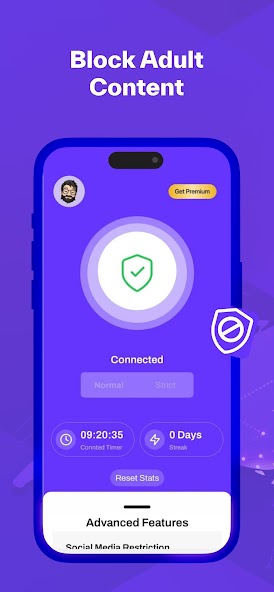
This is the method that actually works. A dedicated porn blocker that filters ALL internet traffic — not just one browser.
🏆 Why BlockerPlus Is the Best Free Option
- ✓Blocks 1M+ adult websites across every browser and app
- ✓Uninstall protection — requires accountability partner approval
- ✓Blocks new browser installs — closes the biggest bypass loophole
- ✓Social media limits — set daily time caps
- ✓TrackerPlus — monitor your progress with streaks
- ✓Free to use — no subscription required for core features
How to set up BlockerPlus (5 minutes):
- Download BlockerPlus from Google Play
- Grant Accessibility Service permission
- Enable Device Administrator for uninstall protection
- Turn on Adult Content Blocking
- (Optional) Enable VPN blocking for deeper protection
- Add an accountability partner
- Done — you're protected ✅
🆚 How BlockerPlus Compares
| App | Price | Uninstall Protection | Browser Blocking |
|---|---|---|---|
| BlockerPlus | Free | ✅ | ✅ |
| BlockerX | Free / $8/mo | ❌ | ❌ |
| Covenant Eyes | $16/mo | ❌ | ❌ |
| DETOXIFY | $3/mo | ❌ | ❌ |
Best Practices
- Layer your defenses — Use DNS blocking + BlockerPlus together
- Set up an accountability partner — Someone who gets notified if you change settings
- Block new app installations — Prevents downloading bypass browsers
- Remove extra browsers — Delete browsers you don't use
- Track your progress — Use BlockerPlus's TrackerPlus feature
- Join a community — r/NoFap and r/pornfree offer support
💡 Pro Tip
Charge your phone outside the bedroom at night. Late-night phone use in bed is the #1 trigger for relapse. Remove the temptation entirely. BlockerPlus + distance from your phone = a winning combo.
FAQ
What is the best free porn blocker for Android?
BlockerPlus is the best free option. It offers content blocking, uninstall protection, browser install blocking, and social media limits — all at no cost.
Do porn blockers slow down my phone?
BlockerPlus is lightweight. The optional VPN feature may use slightly more battery but provides deeper blocking.
Can porn blockers be bypassed?
No blocker is 100% bypass-proof. But BlockerPlus's combination of uninstall protection + new browser blocking + accountability makes it one of the hardest to circumvent.
🛡️ Ready to Block Porn on Your Android?
Join 105,000+ people who took back control. It's free.
Download BlockerPlus Free →Related Articles
- How to Block Adult Websites on Chrome Android
- Best Porn Blockers for Android 2026
- How to Stop Watching Porn: Complete Guide
- Signs of Porn Addiction: How to Know If You Have a Problem
- Best NoFap Apps and Tools 2026

Preetam Rangadal
Founder, BlockerPlus · Digital Wellness Expert
Preetam is the founder of BlockerPlus, used by 105,000+ people worldwide to overcome porn addiction. With a background in mobile development and a passion for digital wellness, he builds tools that help people take back control of their lives. Learn more →
Disclaimer: This content is for informational purposes only and does not constitute medical or psychological advice. If you're struggling with addiction, please consult a licensed healthcare professional. BlockerPlus is a digital tool, not a substitute for professional treatment.