How to Block Xvideos
on Any Device
(2026 Guide)
Xvideos gets over 2.1 billion monthly visits. Whether you're protecting yourself, your kids, or your relationship — here's how to block it permanently.
📋 TL;DR
- Fastest method: Install
 BlockerPlus — blocks Xvideos + 1M other adult sites instantly on Android.
 - Free method: Change your DNS to a family-safe provider (CleanBrowsing, NextDNS).
- Manual method: Edit your hosts file or use browser/OS settings.
- Best combo: BlockerPlus + DNS filtering = virtually impossible to bypass.
Let's be brutally honest for a second.
Xvideos is one of the most visited websites on the entire internet. According to recent traffic statistics, it pulls in over 2.1 billion visits every single month. It's ranked #13 in the US for total traffic, beating out massive mainstream platforms.
But here's the deal: It's also one of the most dangerous sites you can visit. Not just because of the highly addictive nature of the content, but because of the severe privacy and malware risks associated with free "tube" sites.
Whether you're trying to break a porn addiction, protect your kids from stumbling onto explicit content, or safeguard your devices from malicious ads, you need a reliable way to block Xvideos permanently.
I've talked to thousands of guys building BlockerPlus, and I know exactly what works and what doesn't. In this comprehensive guide, I'm going to show you the most effective methods to block Xvideos on any device.
⚠️ Why You Need to Block Xvideos Right Now
Before we get into the "how," we need to talk about the "why." Xvideos isn't just another website. It's a massive platform with serious risks.
First, there's the addiction factor. Xvideos is designed to keep you clicking. With an average session duration of over 12 minutes and an incredibly low bounce rate of 26%, the site's algorithm is optimized to feed you an endless stream of novel, highly stimulating content. This constant novelty spikes your dopamine levels, leading to downregulation of your dopamine receptors and, eventually, addiction and depression.
But it gets worse:
- Malware and Viruses: Free porn sites rely heavily on third-party advertising networks. These networks are notorious for serving malicious ads, pop-unders, and scripts that can infect your device with malware, ransomware, or spyware.
- Privacy Tracking: Xvideos and its ad partners track your browsing habits extensively. They collect data on what you watch, how long you watch it, and your IP address, building a highly detailed profile of your most intimate preferences.
- Child Safety: The internet is a dangerous place for kids, and stumbling onto a site like Xvideos can cause lasting psychological harm. Without proper blockers in place, it's far too easy for a child to accidentally (or intentionally) access explicit content.
2.13B
Monthly visits to Xvideos, making it one of the most trafficked sites on the internet.
You need a robust, foolproof way to block this site. Let's look at the best methods.
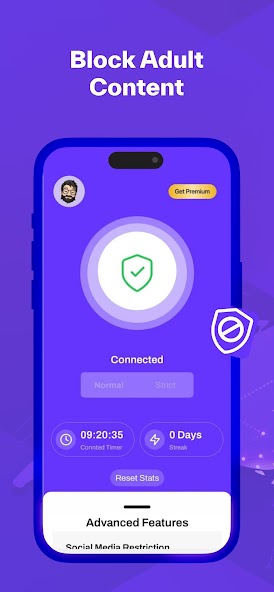
📱 Method 1: The Ultimate Solution (BlockerPlus)
If you're serious about blocking Xvideos on an Android device, you need a dedicated app. Built-in settings are too easy to bypass, and DNS filtering can sometimes be circumvented by a determined user.
This is where BlockerPlus comes in. I built this app specifically to solve the problem of easily bypassed porn blockers.
Here's why BlockerPlus is the most effective method:
- Massive Blocklist: It doesn't just block Xvideos; it blocks over 77,000 adult domains automatically.
- Hard to Bypass: BlockerPlus uses advanced Android accessibility permissions to prevent you from simply uninstalling the app or turning off the blocker in a moment of weakness.
- Keyword Blocking: It actively scans the content on your screen and blocks pages that contain explicit keywords, even if the site itself isn't on the blocklist.
- Accountability: You can set up a PIN code that only a trusted friend or partner knows, making it impossible for you to disable the protection yourself.
🛑 Stop the Cycle Before It Destroys You
Willpower isn't enough when your brain is hijacked. You need a physical barrier.
Download BlockerPlus Free
If you're an Android user, this is the fastest and most reliable way to get Xvideos off your device permanently.
🌐 Method 2: DNS Filtering (Free & Network-Wide)
If you want to block Xvideos on every device in your house—including smart TVs, laptops, and your kids' tablets—DNS filtering is the way to go.
Think of DNS (Domain Name System) as the phonebook of the internet. When you type "xvideos.com" into your browser, your DNS provider looks up the IP address for that site. A family-safe DNS provider simply refuses to look up the address for adult sites, effectively blocking them.
Here's how to set it up using CleanBrowsing (one of the best free options):
On Your Home Router (Blocks All Devices)
- Log into your router's admin panel (usually by typing 192.168.1.1 or 10.0.0.1 into your browser).
- Find the DNS Settings (often under "Network," "Internet," or "Advanced").
- Change the Primary and Secondary DNS servers to CleanBrowsing's Family Filter:
- Primary:
185.228.168.168 - Secondary:
185.228.169.168
- Primary:
- Save your changes and restart the router.
On an Android Device
- Go to Settings > Network & Internet (or Connections).
- Tap on Private DNS.
- Select Private DNS provider hostname.
- Enter:
family-filter-dns.cleanbrowsing.org - Tap Save.
⚠️ The Weakness of DNS
DNS filtering is great, but it has a major flaw: anyone with basic tech knowledge can change the DNS settings back to default in about 30 seconds. If you're struggling with addiction, your addicted brain will easily bypass this. That's why you must combine DNS filtering with an app like BlockerPlus.
👨👩👧 Method 3: Built-in Parental Controls
If you're a parent trying to protect your child's device, both Apple and Google offer built-in tools that can block Xvideos and other explicit content.
For iPhone/iPad (Screen Time)
Apple's Screen Time feature is surprisingly robust for blocking adult content.
- Go to Settings > Screen Time.
- Tap Content & Privacy Restrictions and turn it on.
- Tap Content Restrictions > Web Content.
- Select Limit Adult Websites.
- Under "Never Allow," tap Add Website and type
xvideos.com.
Make sure you set a Screen Time Passcode that your child doesn't know, or they can easily turn this off.
For Android (Google Family Link)
Google Family Link allows you to manage your child's device remotely.
- Open the Family Link app on your (the parent's) device.
- Select your child's account.
- Tap Controls > Content restrictions > Google Chrome.
- Select Try to block explicit sites.
- You can also go to Manage sites > Blocked and manually add
xvideos.com.
💡 Pro Tip
Built-in parental controls only work on the default browsers (Safari and Chrome). If your child downloads a third-party browser or uses an app with an in-app browser (like Reddit or Twitter), they can bypass these restrictions. Always restrict app installations as well.
💻 Method 4: The Hosts File (For Windows & Mac)
If you want to block Xvideos on a desktop computer without installing any software, you can edit the system's "hosts" file. This tells your computer to redirect any requests for Xvideos to a dead end.
On Windows
- Click the Start menu, type Notepad, right-click it, and select Run as administrator.
- Go to File > Open.
- Navigate to
C:\Windows\System32\drivers\etc. - Change the file type dropdown in the bottom right from "Text Documents" to "All Files".
- Open the file named hosts.
- At the very bottom of the file, add this line:
127.0.0.1 xvideos.com - Add another line:
127.0.0.1 www.xvideos.com - Save the file and restart your browser.
On Mac
- Open the Terminal app.
- Type
sudo nano /etc/hostsand press Enter. - Enter your Mac administrator password.
- Use the arrow keys to navigate to the bottom of the file.
- Add the lines:
127.0.0.1 xvideos.comand127.0.0.1 www.xvideos.com. - Press Ctrl+O, then Enter to save.
- Press Ctrl+X to exit.
- Flush your DNS cache by typing:
sudo dscacheutil -flushcache.
🎯 The Bottom Line
Blocking Xvideos is a crucial step in protecting your mental health, your privacy, and your family. But remember: no single method is perfect.
If you rely solely on DNS filtering or a hosts file, a moment of weakness can undo all your hard work. The most effective strategy is a layered approach.
Set up DNS filtering on your home router to protect all your devices, and then install a dedicated, hard-to-bypass app like BlockerPlus on your personal smartphone. By creating multiple layers of friction, you give your rational brain time to catch up before your addicted brain makes a mistake.
Ready to Take Back Control?
Join thousands of men who've broken the cycle with BlockerPlus.
Download BlockerPlus Free
❓ Frequently Asked Questions
Can Xvideos give my phone a virus?
Yes. Xvideos is notorious for third-party ads and pop-ups that can contain malware, spyware, and tracking cookies. Even if you don't click the ads, malicious scripts can sometimes execute in the background. Blocking the site entirely is the best way to protect your device.
How do I block Xvideos on my child's phone?
The most effective way is to use a combination of Google Family Link (or Apple Screen Time) and a dedicated blocker app like BlockerPlus. You should also change your home router's DNS to a family-safe provider like CleanBrowsing to ensure protection across all devices on your Wi-Fi network.
Can I block Xvideos without my partner knowing?
While you can change router DNS settings silently, it's generally better to have an open conversation about pornography use in a relationship. Secretly blocking sites often leads to trust issues and the person finding workarounds. If you're dealing with betrayal trauma, consider seeking professional counseling together.
📚 Related Reading

The BlockerPlus Team
Digital Wellness & Addiction Recovery Experts
The BlockerPlus team combines expertise in behavioral psychology, digital wellness, and software engineering to create evidence-based tools and resources for people recovering from compulsive pornography use. Our content is researched using peer-reviewed studies and reviewed for accuracy before publication. Learn more about our mission →
📚 References & Sources
- Semrush Traffic Analytics, 2026 — Traffic statistics and engagement metrics for xvideos.com
- MalwareFox Security Report — Analysis of third-party advertising networks and malware risks on adult tube sites
- CleanBrowsing DNS — Technical documentation on implementing family-safe DNS filtering protocols
All sources were accessed and verified as of April 2026. This article is for informational purposes only and does not constitute medical advice. If you are struggling with compulsive behaviors, please consult a licensed mental health professional.
Preetam Rangadal
Founder, BlockerPlus · Digital Wellness Expert
Preetam is the founder of BlockerPlus, used by 105,000+ people worldwide to overcome porn addiction. With a background in mobile development and a passion for digital wellness, he builds tools that help people take back control of their lives. Learn more →
Disclaimer: This content is for informational purposes only and does not constitute medical or psychological advice. If you're struggling with addiction, please consult a licensed healthcare professional. BlockerPlus is a digital tool, not a substitute for professional treatment.